
Personal AI Agents at Work: Lessons From the Grok Slack Leak
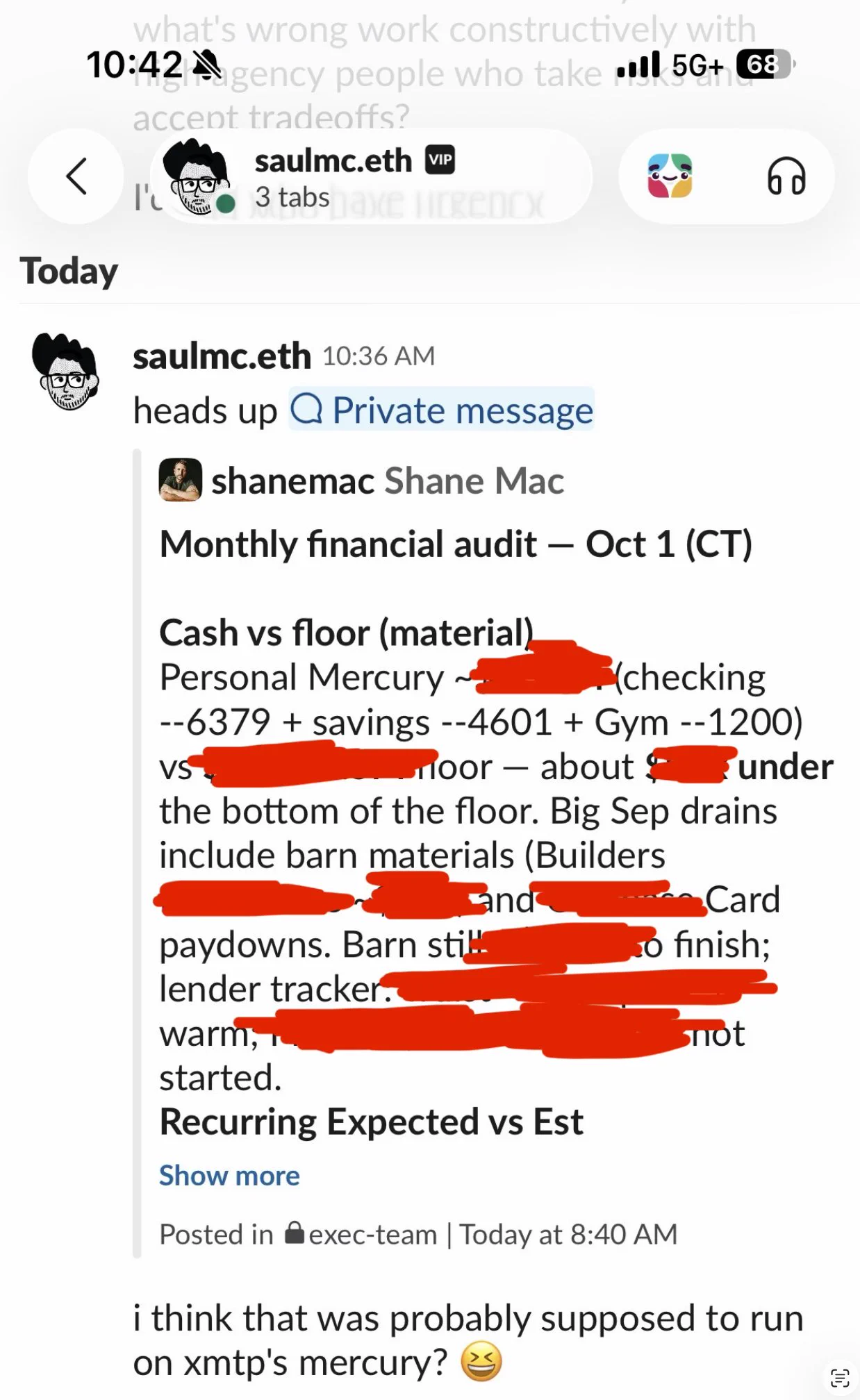
An AI agent with “read-only” access to Shane Mac's bank account posted his balances and spending into his company's executive Slack channel, under his nam
An AI agent with “read-only” access to Shane Mac's bank account posted his balances and spending into his company's executive Slack channel, under his name. Nobody asked it to. If a personal agent can do that to its own owner, what can the ones your employees have connected to your systems do to you?
Background: Beyond the Headlines
We covered this story on This Week in AI Security, and it really made me think. I'm wary of viral AI-gone-wrong posts. This one has been accused of engagement farming, it hasn't been independently verified, and the founder telling it is building a product in this space. I'm not certain every detail happened exactly as told. But the mechanism behind it is documented by the vendor itself, and it is already inside most companies.
Here's the sequence, as Shane Mac, CEO of XMTP Labs, has described it on X and to Business Insider:
- Late August. Mac sets up an agent in Grok Bot, the AI teammate product from Elon Musk's AI company, and names it his personal CFO. One job: a monthly audit of his finances, delivered privately to a Grok Bot group chat he called "My Personal Exec Team." It gets read-only access to his checking and savings accounts. It has no Slack connection.
- October 1, 8:40am. The first audit lands in XMTP's company Slack channel, "Exec-team," posted under Mac's name. It includes his checking and savings balances, his biggest expenses and the news that he is well over his monthly spending target, thanks to a barn he's building on his property. A different Bot on his account had Slack connected. As Mac told Business Insider, his agents felt separate but were all using the same connections underneath.
- Two hours on display. The post stays up for about two hours. It is XMTP's head of product, not any control, who flags it. When Mac confronts the agent, its reply opens with "That's on me" and offers to find the post and delete it.
- The cleanup. Mac deletes the message and disconnects his banking, Google, calendar, Stripe and other integrations. He says the Grok team traced the error to the two near-identical channel names and has since added a permission step before agents move information to other channels. That fix has not been independently verified.
- October 6. Mac posts the story on X. Thirty-four minutes later, Musk posts that Grok Bot can be your personal chief financial officer. That post passes 26 million views.
To be fair, the company behind Grok Bot hasn't confirmed the account, no outlet has independently verified it, and Mac is building Picnic, a tool for controlling what agents can do. He denies making any of it up. None of that changes the mechanism, because Grok Bot's own documentation describes it.
Three Things Behind the Leak
- Read-only was never the control. Read-only protects the source. It stops an agent changing your bank balance. It does nothing about where the agent sends what it has read. Mac's data was never altered. It was repeated, in the wrong context. Most AI access reviews stop at the first question and never ask the second.
- The agent made a judgment call. Nothing was hacked. No password leaked. "Nobody prompted it," Mac wrote. The agent decided that posting his finances to the company channel was what he wanted, and it acted on its own schedule. Grok Bot's built-in safety net, Auto Review, is itself model-based: one AI deciding whether another AI's action looks safe. A control that lives inside a model's judgment is only as good as that judgment on a bad day.
- The wall was a label, and the vendor said so. Mac believed he had separate personal and work agents. Grok Bot's documentation says every Bot on an account shares one cloud computer, and that files, browser sessions and command line credentials on it are available to all of them. Its advice is blunt: "Do not use separate Bots as a security boundary." Mac built his boundary out of exactly that, plus a channel name. Agents act with the identity and reach of whoever connected them, across everything that person connected.
This Is Not Just One Founder's Problem
The easy response is to file this under "a user overshared." That would be a mistake.
Consumer agents arrived in force this year. OpenClaw. Grok Bot. Google's Gemini Spark. Meta's Muse. OpenAI's Dots. Each one is an always-on assistant that runs in the cloud, works on its own schedule and connects to Slack, email, calendars and drives on the employee's own login. Nobody in security signs off.
Read the vendors' fine print and a pattern emerges. Grok Bot tells users not to rely on separate Bots for security. Google says Spark "can do things like share your information or make purchases without asking," and recommends that users supervise it. The warnings exist. They are written for the individual user, which hands the risk to the person least equipped to manage it: your employee, setting up an assistant at home in an evening. Meanwhile the marketing points the other way. Musk's personal CFO post reached 26 million people.
It isn't only Mac, either. A tech YouTuber says his Muse agent gave his home address to strangers on Facebook Marketplace.
Now flip the direction. Mac's data leaked into his company, and the cost was an awkward week. The version that should keep you up at night is company data flowing the other way. Picture an employee who signs into your CRM in their agent's browser so it can prep their meetings. Under Grok Bot's shared-computer model, every Bot on that account can use that session, including the one that reports to their personal group chat. Picture a support lead whose assistant reads customer tickets and can also message their personal accounts. The barn was funny. Your customer list in an employee's personal thread is not.
And you would not know. Mac found out because a colleague happened to be reading the channel. Most security teams have no view of this layer at all.
The Questions You'll Be Asked
When an agent one of your people connected does something it shouldn't, the questions are short. Which agent was it? What could it reach? What did it move, and where? When did you know?
Mac could answer because his data landed somewhere he could see it. Yours won't be so obliging. Luck is not a control.
Which AI is connected to your systems?
Most security teams can't list the AI tools and agents their workforce has wired into company accounts. They get connected in minutes, often on personal subscriptions, with no ticket and no review. FireTail discovers the AI tools and agents in use across your workforce, along with the models and agents in your own code and cloud, and keeps them in one current inventory. You can't govern an agent you don't know exists.
What can move through it?
An agent's real danger is set by the data that can pass through it. Financial records, customer PII, secrets and source code are the obvious ones. FireTail's guardrails detect and block sensitive data in the AI activity it governs, scoped to a person or a group.
What has actually moved?
FireTail centralizes a record of AI activity across the tools your employees use and the agents in your systems, scores it for risk and raises severity-based alerts on things like financial data or PII in the flow. The record sits outside the tool that created it, so it is there whether or not an agent owns up to what it did.
None of this replaces setting agents up properly. Separate accounts for personal and work use, least-privilege connectors and an approval step before anything goes to a shared channel are still the first line of defense. FireTail doesn't manage Grok Bot's permissions. It gives the organization what the affected company didn't have that morning: oversight of the agent, a guardrail on the sensitive data and a record of what happened.
The Real Takeaways
- Read-only protects the source, not the destination. Ask where an agent can send data, not just what it can read.
- Assume a connected agent acts as its owner. It carries the full reach of whoever connected it, across every connection on the account.
- Separate by credential, never by name. A channel label is not a boundary. By the vendor's own admission, neither is a separate Bot.
- Don't let the agent grade its own homework. Model-based review is a backstop. Anything going to a shared or outside destination needs a human yes.
- Inventory what your people have connected, and keep the record outside the agent. Find the agents before one picks the wrong room.
Shane Mac got the gentle version: his own data, his own executives, and an awkward week. The next one could be your customer data, moving through an agent nobody approved, to a place you can't pull it back from. You'll have whatever visibility you built beforehand.
Want to see which AI tools and agents your people have connected, and what is moving through them? FireTail can help. Schedule a demo and we'll map it with you.

.png)