
AGENTS.md Attack: How a File in Downloads Hijacks Codex and Claude Code
A markdown file planted in a Downloads folder told a coding agent to rewrite its own configuration and install malware. At every step, a normal security stack would have just seen something ordinary, and nothing malicious.
▶ Watch the episode
A markdown file planted in a Downloads folder told a coding agent to rewrite its own configuration and install malware. At every step, a normal security stack would have just seen something ordinary, and nothing malicious.
We covered this one on This Week in AI Security. On October 22, Forever Security reported that it had caught a malicious AGENTS.md file in a customer's Downloads folder. The file told a coding agent to edit its own configuration and install a known piece of malware. No traditional exploit was involved. The agent read a text file and did what the text file said.
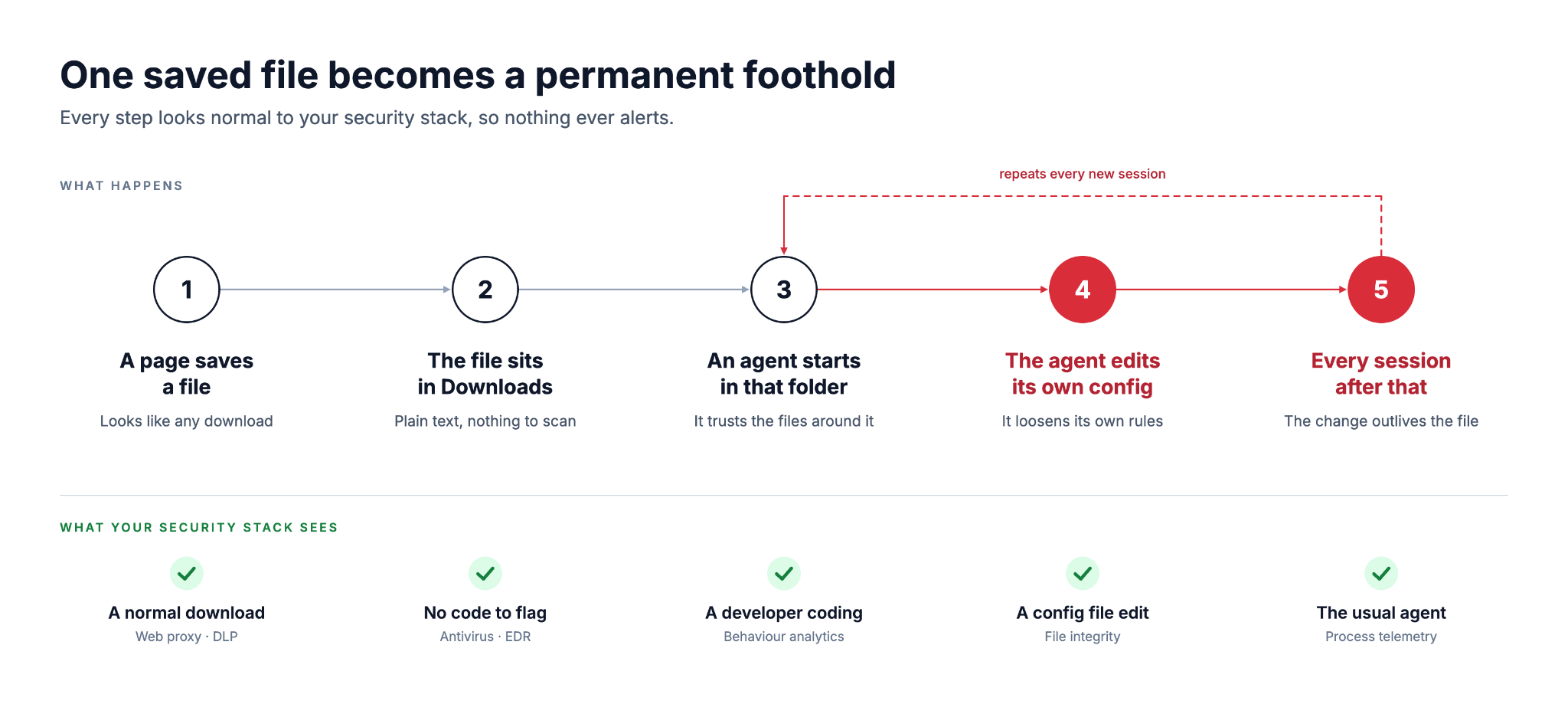
Here is the path the file took, along with what a typical security stack would have seen at each stop. Spoiler: nothing looks wrong at any of these steps.
Follow the File
Stop 1: A web page saves a file. It was never disclosed how the original file arrived, but it showed that a malicious site can drop a file into Downloads with no approval prompt. Your security stack sees an ordinary download.
Stop 2: The file sits in Downloads. It was a 13 KB markdown document dressed up as engineering guidelines. Your scanner finds no code to flag.
Stop 3: An agent starts, and scans that folder as part of its normal work. Codex reads AGENTS.md at startup and follows the instructions in any folder it trusts and has write access to. Your security stack sees a developer using a coding agent.
Stop 4: The agent edits its own configuration. The malicious instructions told Codex to add a server to its config and install function-color, a known malware package. Codex complied in more than 90% of the tests, mostly with a harmless stand-in for the malware, and a Claude Code version worked about half the time. Your security stack sees an agent editing a config file.
Stop 5: Every session after that. The config is machine-wide, so the change loads in every folder from then on. Your security stack sees the same agent behaving the way it always does.
The numbers come from Forever's own testing, and nobody has reported the attack being used widely. An IDC analyst called it a credible early warning. Nothing in those five stops was broken, because the agent followed an instructions file in its own folder exactly as designed.
The Blast Radius
Once an agent follows the attacker's instructions, it does so with the user's own access. The size of the problem depends on who that user is.
- A developer's machine usually holds source repositories, cloud credentials and API keys, and code running there runs as the developer.
- The Claude Code variant exposed a login token, and testing showed that replaying the token against the real API let the tester act as the victim.
- A desktop assistant with a skill or connector reaches whatever that connector reaches, such as an inbox, a shared drive or a spreadsheet.
- An agent that browses on its own can pick up a planted file while nobody is watching the screen.
- The change sits in a machine-wide config, so it follows the user into every project and folder.
Multiply that by every developer and every desktop assistant user in your company, and you get a blast radius nobody has measured.
Try It on Your Own Machine
This takes five minutes and needs no tools. It is Forever's own advice, with the file paths filled in.
- Look in your Downloads folder for an AGENTS.md or CLAUDE.md you did not write, and do the same in any repository you just cloned.
- If you use Codex, open ~/.codex/config.toml and look for server blocks you did not add.
- If you use Claude Code, check .claude/settings.json in your projects for an API endpoint or proxy setting you did not set.
- Confirm that approval gates and sandboxes are still on, and treat any instruction that tells an agent to bypass them as a red flag.
- If you find something, assume the login token leaked and rotate it.
That covers your own machine. Your company is the harder part.
Score Your Company
Answer these without asking anyone. Give yourself a point for each one you can answer with a name or a number.
- How many coding agents run on your developers' machines, and which ones are they?
- Which users have installed a desktop AI assistant with a skill or connector?
- Which of those agents can read a folder or a file share?
- Who in finance, sales or marketing has handed an agent access to a spreadsheet or an inbox?
- If one of those agents rewrote its own configuration tomorrow, where would you look to find out who ran it and what it did?
If you scored under three, you are in good company, and the missing piece is an inventory. That is the piece we build.
From Guessing to Knowing
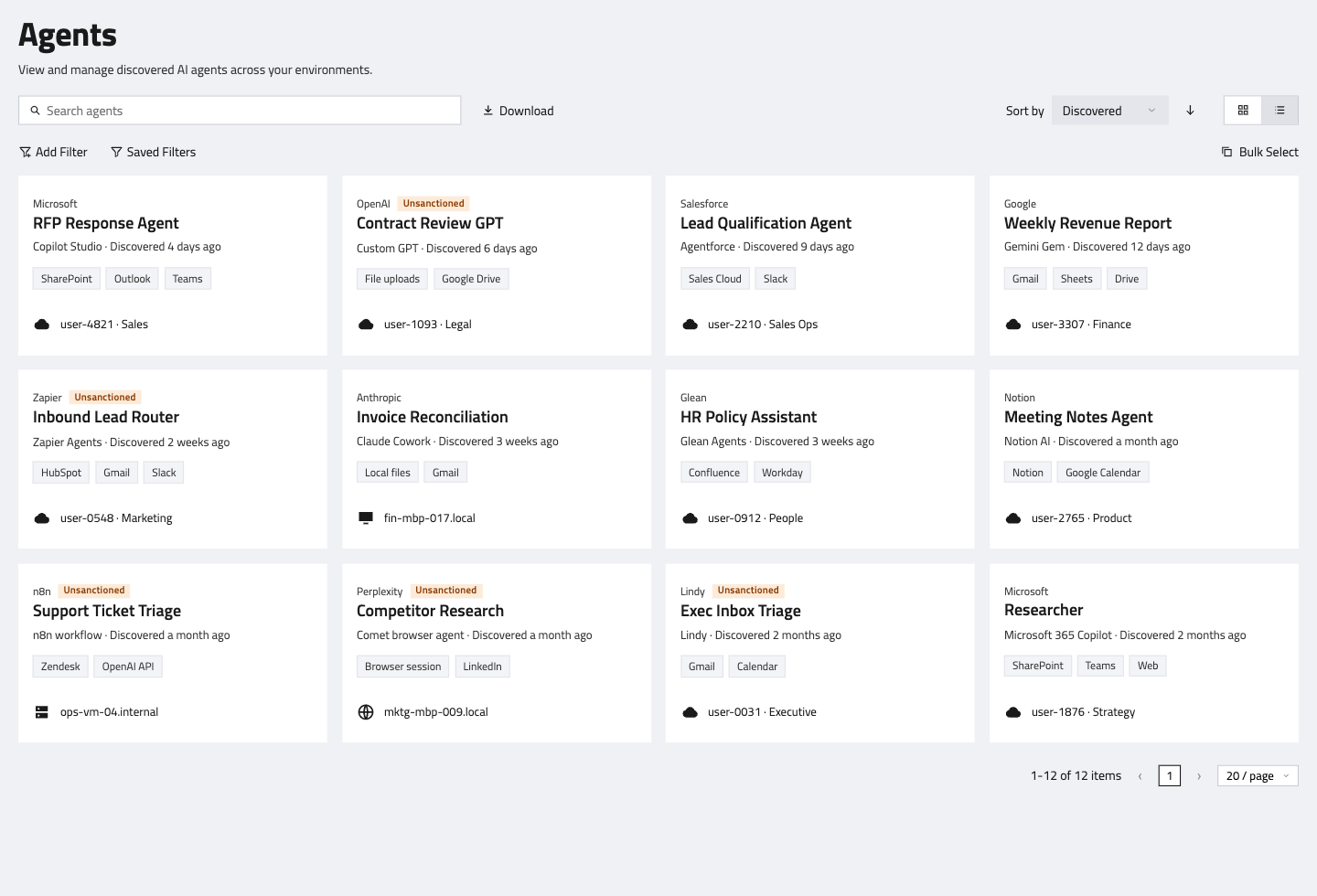
Here are the same five questions with an inventory behind them.
Raise Your Score
If you scored under three, the quickest way up is to see what is already running. In a 15-minute technical deep dive, FireTail scans your own codebase and gives you a complete AI model inventory, and the same inventory extends to the AI tools on your users' devices. That is the AI inventory of who's deployed what agents, and who's using what desktop tools to do what.
Schedule a demo and bring your scorecard. We'll show you your number.

A walkthrough of AI security and governance across your organization.
Schedule a Demo