JPMorgan Won't Let AI Agents Use Its Customers' Logins. Your Employees Are Handing Agents Theirs.
JPMorgan Chase has blocked outside AI agents from logging into customer accounts, and told customers who hand an agent their credentials that the liability is theirs.

JPMorgan Chase has blocked outside AI agents from logging into customer accounts, and told customers who hand an agent their credentials that the liability is theirs. Your employees are giving agents logins to your systems right now. Who carries that liability?
Background: Beyond the Headlines
We covered this story on This Week in AI Security, and it's one of my favorites in a while, mostly because nothing blew up (for once). No breach. No rogue agent. A bank looked at a new class of tool and decided where to draw the line.
That's exactly what makes it interesting. The largest bank in the US looked at personal AI agents and decided they were too risky to let near customer money. Have your employees already let agents near your money? Or your critical systems?.
Here's the high level:
- September 8. Meta launches Muse, a personal AI agent that sends emails, books travel, fills in forms and buys things on your behalf. It runs on Muse Secure VM, a dedicated computer in Meta's cloud with its own browser.
- October 13. On JPMorgan's third-quarter earnings call, CEO Jamie Dimon says the bank won't let just any outside agent in, because it's too risky for clients and for the bank. Then he adds: "You don't want rogue agents, and there could be thousands of them."
- The policy. A JPMorgan spokeswoman confirms to CNBC that external agents are blocked from operating on behalf of retail customers, and that the bank doesn't let third parties collect customers' credentials to log in for them. Agents can still pull view-only data, such as balances, through intermediaries like Plaid. They can't move money or pay bills. CNBC names Meta's Muse and the startup Instinct as examples of the agents affected.
- The warning. Dimon tells customers using these agents that they should understand the risk, because there's a "liability transfer." Hand an agent your login, and whatever it does is on you.
To be fair, a bank protecting its own turf is the crux of this story. JPMorgan is building its own agents for customers. Commercial self-interest and a real security concern can both be true at the same time. The line it drew is still the right one to study.
Three Things Behind the Headline
- The line is the login. Reading balances through an approved connector is fine. An outside party logging in as the customer is not. Once an agent holds the credential, the bank can't tell the agent from the person. Neither can you. Your single sign-on, your MFA and your logs will all see a legitimate session from a legitimate user. When an agent does something it shouldn't with an employee's login, your logs will say the employee did it.
- Liability follows the credential, but not in your favor. Dimon can push the risk back onto his customers. You can't push it onto your employees. When a sales rep's agent forwards a pricing sheet, or a finance lead's agent reads the close file, your customers, your auditors and your regulators won't care whose idea the agent was. The liability lands on the company.
- The bank has a front door. You don't. Every agent that wants into a Chase account has to come through Chase, so Chase can say no. Employee agents don't arrive through a door you control. They arrive on an employee's own login, through a browser, a workspace connection, a skill or connector on a desktop AI application or a personal device, and nobody in security signs off.
This Is Not Just a Banking Problem
The easy response is "good for the bank, but I'm not a bank." That would be a mistake.
Picture these scenarios:
- a sales rep who connects a personal assistant to the inbox where pricing and contracts live.
- a finance lead who lets one read the close spreadsheet.
- an engineer who points one at a repo and a cloud console.
Each of them has done exactly what Dimon warned his customers about: handed an agent a login. The difference is that the data belongs to your company, and that’s all that the regulators will care about.
Then ask where that login now lives. Muse keeps credentials on a computer in Meta's cloud. Meta describes serious protections, including a separate supervisor agent that approves every outbound request and a credential vault the agent itself can't read. Those are Meta's own descriptions, not independently audited, and the fully encrypted version is still a promise. Other agents are looser. As we covered last week, Grok Bot's own documentation says browser sessions and credentials on its cloud computer are shared across every Bot on the account. The security of your corporate login now depends on which consumer app your employee happened to pick.
And this is moving fast. Muse launched on September 8. Five weeks later, the largest bank in the country had a public position, built on what its CFO described as a long record of opposing credential sharing. Most companies still have no position at all. If you haven't decided, your employees have decided for you.
The Questions You'll Be Asked
When something goes wrong, the questions will be short. Which agent was it? Whose login did it use? What went through it? Who approved it? Most companies couldn't answer any of them today.
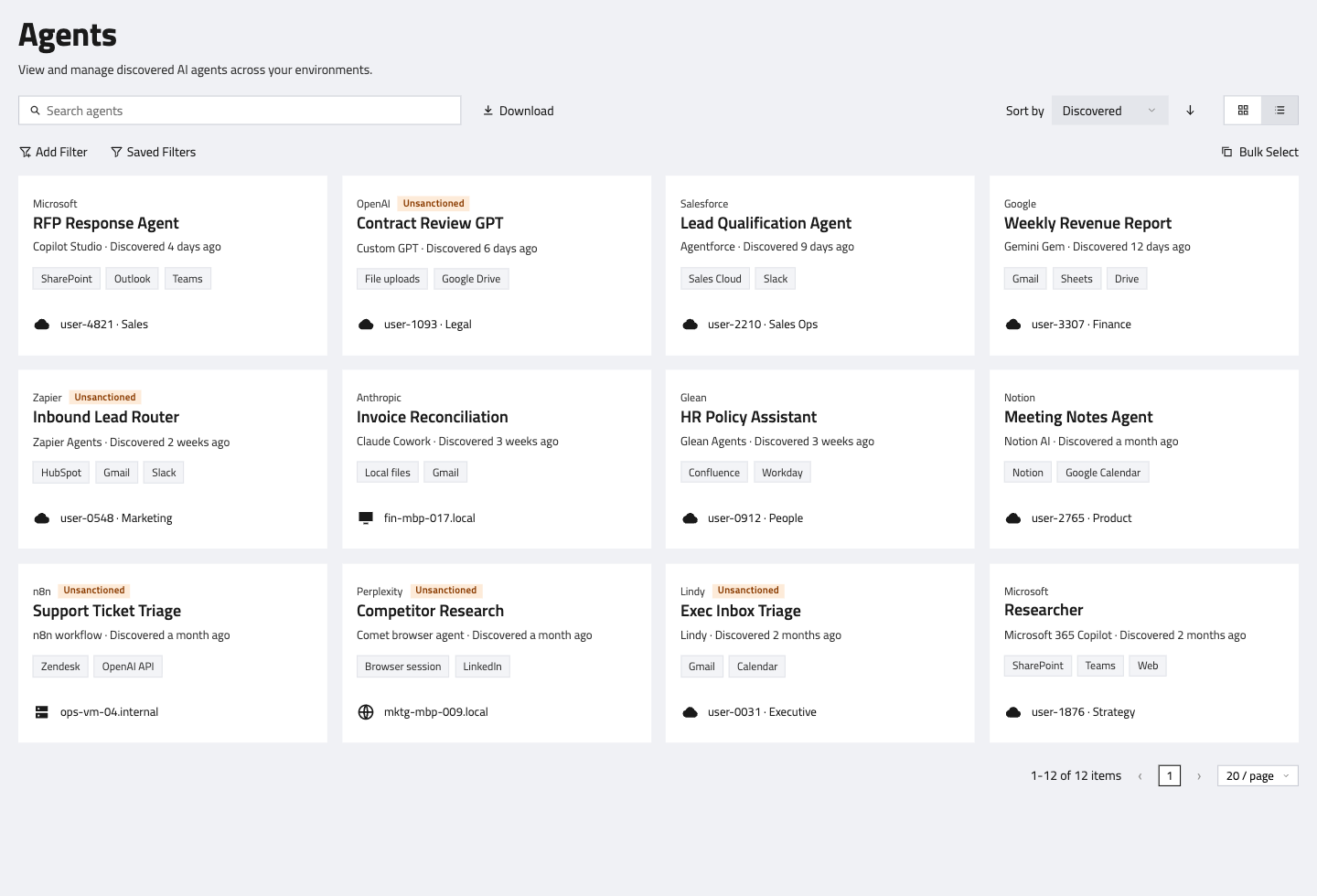
Which agents are your people running?
Most security teams can't answer this. FireTail discovers the AI tools and agents your workforce uses across the browser, workspace and endpoint, and ties each one to an employee, a device and a group. They land in one current inventory, and new tools show up as soon as they're used.
What company data is going into them?
FireTail's guardrails detect and block sensitive data in the AI activity it governs, including financial records, personal information, credentials, source code and customer data. Policies can allow, restrict or block a prompt or LLM interaction, scoped to a person or a group or a particular topic, so finance can have a different rule from marketing.
What have they done, and who owns it?
FireTail keeps a central record of that activity, covering what was asked and what went in, with severity-based alerts so your team sees the worst first. Every record is attributed to a named person and the group they sit in. When the question is who connected an agent and what went through it, the answer is a name and a log.
One honest limit. FireTail sees which agents your people use and what they send to them. It can't see inside an agent's own cloud computer once it's acting on its own. That's why the login matters so much: keep company credentials out of personal agents in the first place, and know which agents are out there so you can act on the ones that slip through.
The Real Takeaways
- Treat a shared login as a handover of liability. For a bank's customers, it lands on the customer. But for the bank itself, it can land on them, just as for your company, it lands on you.
- Write a policy for personal agents. Allowed, restricted or blocked, by group, platform or use case. "We haven't thought about it" is an allow-all policy by default.
- Keep company credentials out of personal agents. Use sanctioned connectors, never a pasted login.
- Inventory what your people already run. You can't set a rule for an agent you've never seen.
- Keep a record that names the person. Liability questions come down to who connected what, and when.
JPMorgan can say no because it owns the front door. Most companies don't, which is why knowing what's already inside matters more. After an incident, the question will be what you knew and when.
Want to see which personal AI agents your people are running, and what's going through them? FireTail can help. Schedule a demo and we'll show you what's already there.