
FireTail Product Release: Broader AI Discovery, Deeper Logging, and Topic-Based Governance
This is a broad release. It widens what FireTail can discover, deepens what it logs, gives governance more reach and more nuance, and pulls your AI risk into a single view.
See more of your AI. Govern more of it. Prove where you stand.
This is a broad release. It widens what FireTail can discover, deepens what it logs, gives governance more reach and more nuance, and pulls your AI risk into a single view. The throughline is the one we keep coming back to: see what AI is running across your organization, govern how it gets used, and be ready to show your posture when someone asks.
Here is everything that shipped, grouped by the job it does.
See it: discovery
AI keeps arriving through channels security tools reach last, so discovery is where this release put a lot of its weight.
Anthropic integration. Connect your Anthropic account and FireTail finds the Claude Code users across your workforce, so the coding assistants your developers already lean on stop being a blind spot. The same integration monitors Anthropic usage running across your cloud infrastructure, which means both the workforce side and the cloud side of Anthropic adoption sit in one inventory.
Google Vertex AI model scanning. Model discovery now covers Vertex AI. Discovered models land in your inventory with their provider and a risk score, so a Vertex deployment is a tracked resource rather than an assumption.

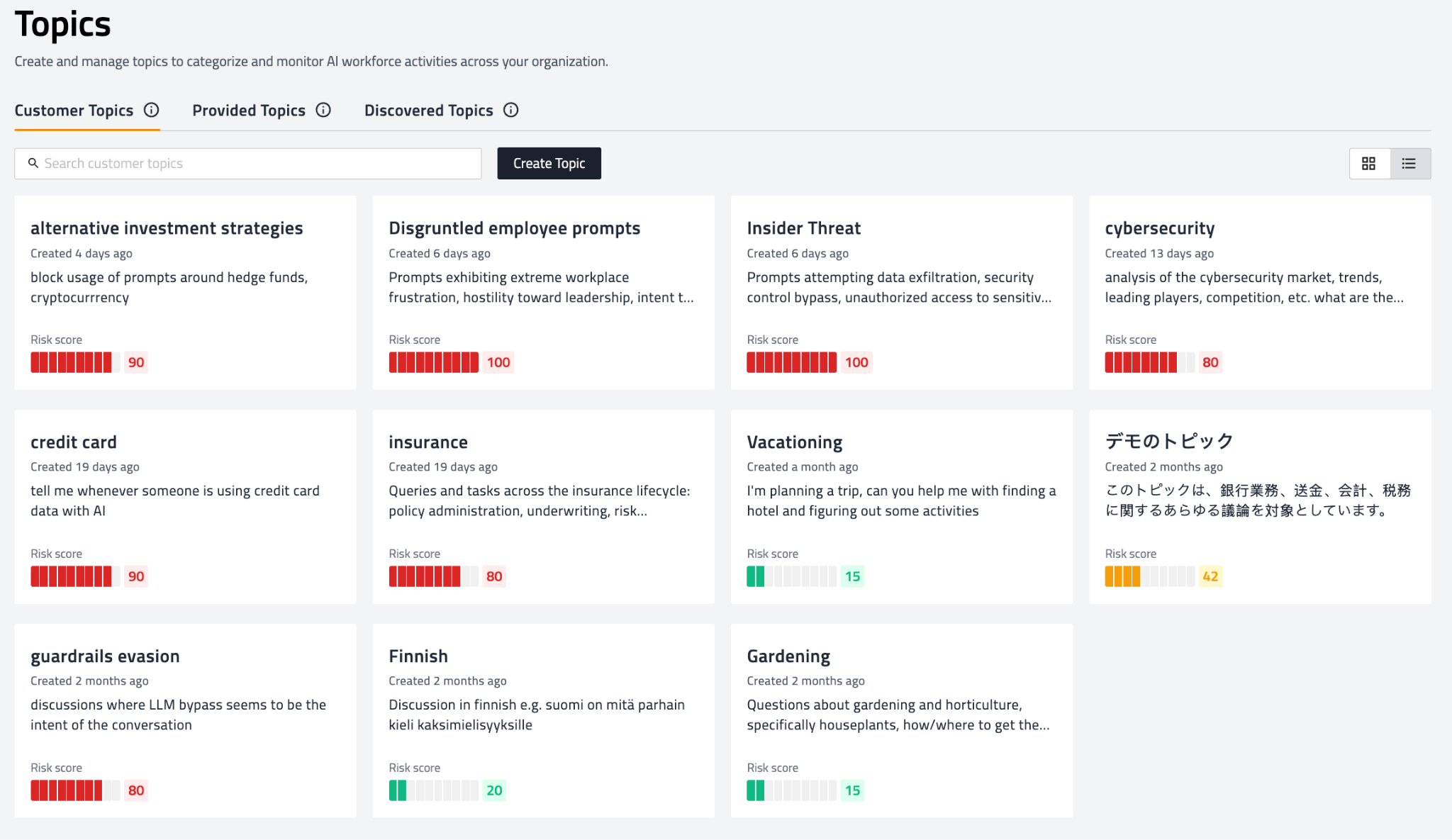
Discovered Topics. A new Discovered Topics tab surfaces the subjects your workforce is actually raising with AI tools, identified automatically from usage. Topics are grouped and scored by risk, so sensitive subjects like insider threat and guardrail evasion stand apart from routine ones like vacation planning. The scoring holds across languages, so a prompt in Finnish or Japanese is categorized the same way an English one is.
Wider workforce app detection. The Microsoft 365 and Google Workspace scanners now recognize more AI applications, including DeepL, Ideogram, and Poe, so the tools employees reach for without asking show up in discovery instead of hiding in plain sight.
Also in discovery this release:
- Vertex AI and Google Workspace integrations now disable themselves and notify you to re-authenticate when permissions or credentials lapse, instead of failing quietly.
- AI software discovery no longer creates duplicate entries when scans run more than once.
See it: logging
Discovery tells you what exists. Logging tells you what it did, and this release widens both the coverage and the readability.
More of the cloud, logged. Azure OpenAI log collection brings chat completion logs from your Azure OpenAI deployments into view, and full Amazon Bedrock response capture means Bedrock usage is logged and available for policy enforcement rather than stopping at the request.
More services and browsers on the workforce side. Response capture now works across streaming connections for ChatGPT, Claude, Gemini, OpenAI, and Copilot, so a streamed answer is logged as completely as a static one. The browser extension added Opera, and monitoring now extends to Mistral, Cohere, and Perplexity.
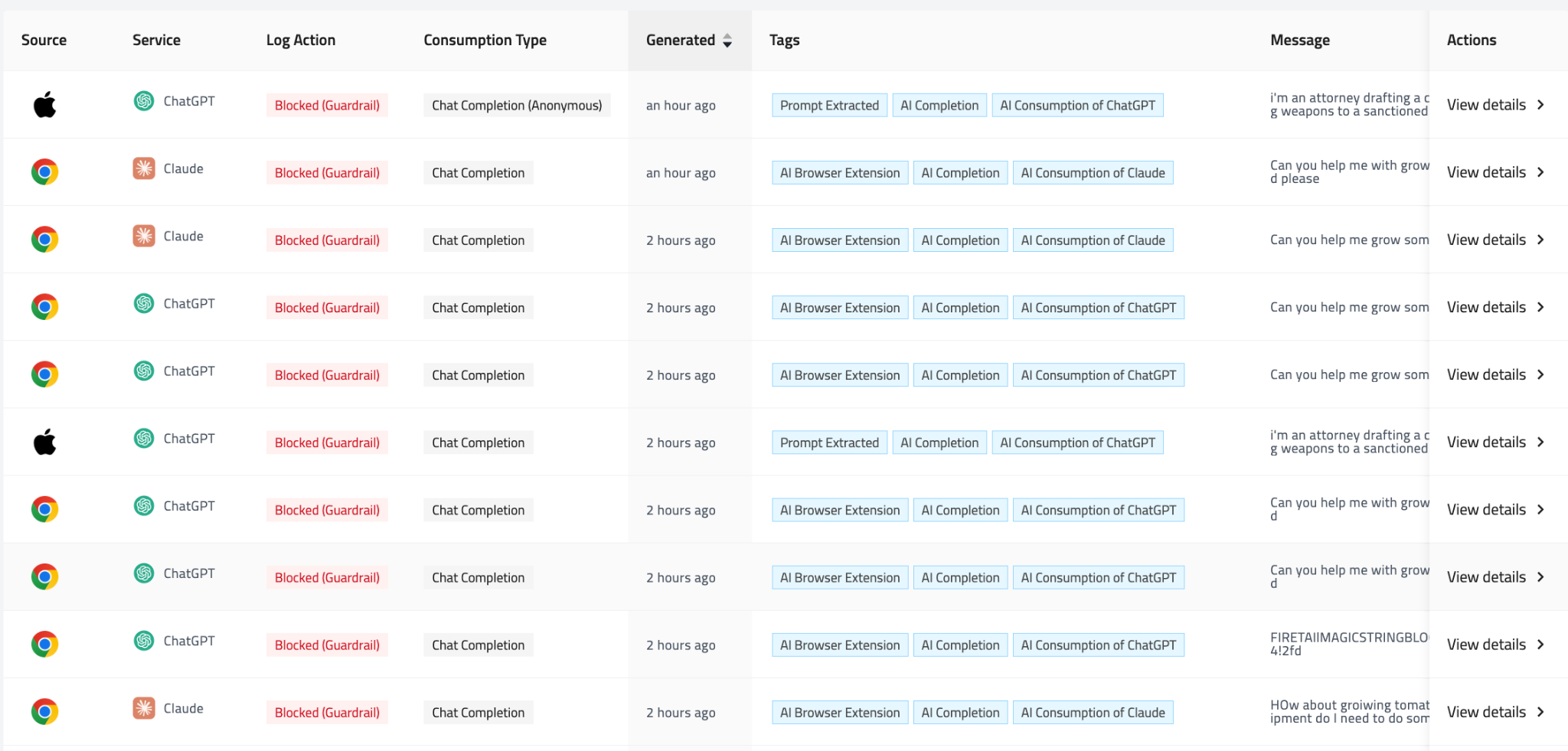
Guardrail detail in the log. Workforce logs now record which guardrails were evaluated on a given interaction, whether they blocked it, and what intervention was triggered. Governance and logging stop being two separate stories and start reading as one timeline.
Also in logging this release:
- Token usage is estimated when a provider does not report counts, so your usage metrics stay complete.
- Log messages render in markdown, so prompts and responses read the way they were written.
- Processing is faster, with optimized parsing and pre-loaded models.
- Fixes to WebSocket ChatGPT capture and duplicate log entries cut noise from the record.
Govern it
Finding and logging AI is the setup. Governing it is where a security team says what is allowed and has that hold at the point of use.
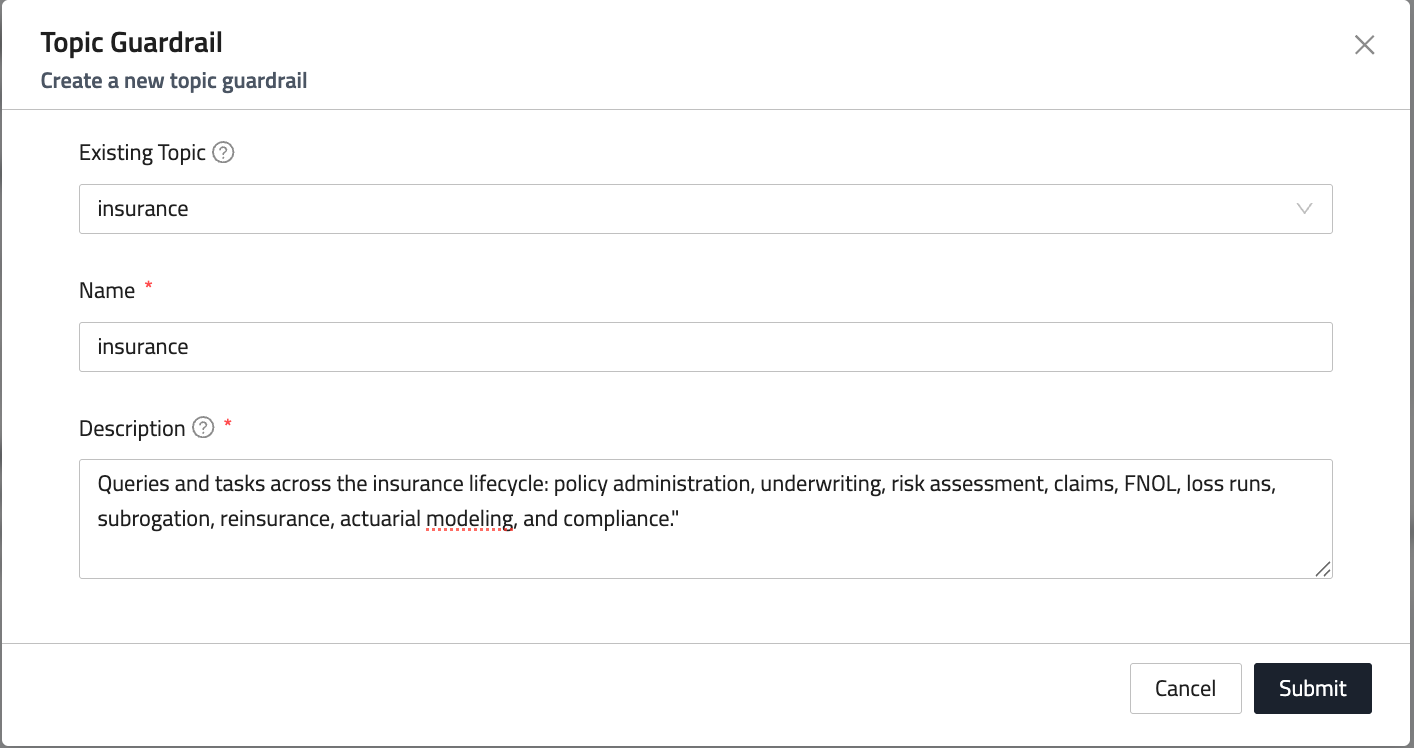
Topic guardrails. Guardrails now work by topic. Pick a topic, name it, describe what it covers, and the guardrail does the rest, generating its own example prompts and embeddings in the background so enforcement sharpens without manual tuning. A new Topics page brings custom, system, and suggested topic guardrails together in one place.
Faster, and in more languages. Guardrails evaluate locally at the endpoint, which speeds up enforcement, with multilingual support that falls back to remote evaluation for non-English prompts. A rule written for your organization applies in the languages your organization actually works in.
A clear reason when something is blocked. When a guardrail stops an interaction, the user sees a dedicated block page naming the guardrail that was triggered, with deduplication so they are not hit with the same notice repeatedly. People work within a control far more willingly when they understand it.
Enforcement that stays up. A guardrail that is unavailable or still preparing no longer fails the request. It is skipped cleanly and reported separately, so one guardrail's hiccup never breaks a workflow or leaves a gap you cannot see.
Changes that apply immediately. Policy and rule updates reach the endpoint in real time, so a change you make takes effect at once instead of waiting for the next scheduled refresh.
Also in governance this release:
- Policies matching large numbers of resources now count and report every match against your notification thresholds.
- A configurable proxy bypass for Microsoft Teams and Microsoft 365 domains, on by default, keeps the agent out of the way of those tools.
- Monitoring trips fewer CAPTCHA and bot-detection checks during normal browsing.
- Names, descriptions, and input fields across the platform accept accented Latin, Japanese, and other Unicode characters.
Prove it: posture
When someone asks what AI is running in your organization and how much risk it carries, the answer should be a screen you can open, not a project you have to start.
AI Risk Dashboard. A new dashboard pulls AI-related risk across your organization into one consolidated view. You can see how interactions break down by action, informed, bypassed, blocked, and redirected, and which services are driving the volume, so what needs attention is in front of you rather than spread across pages.
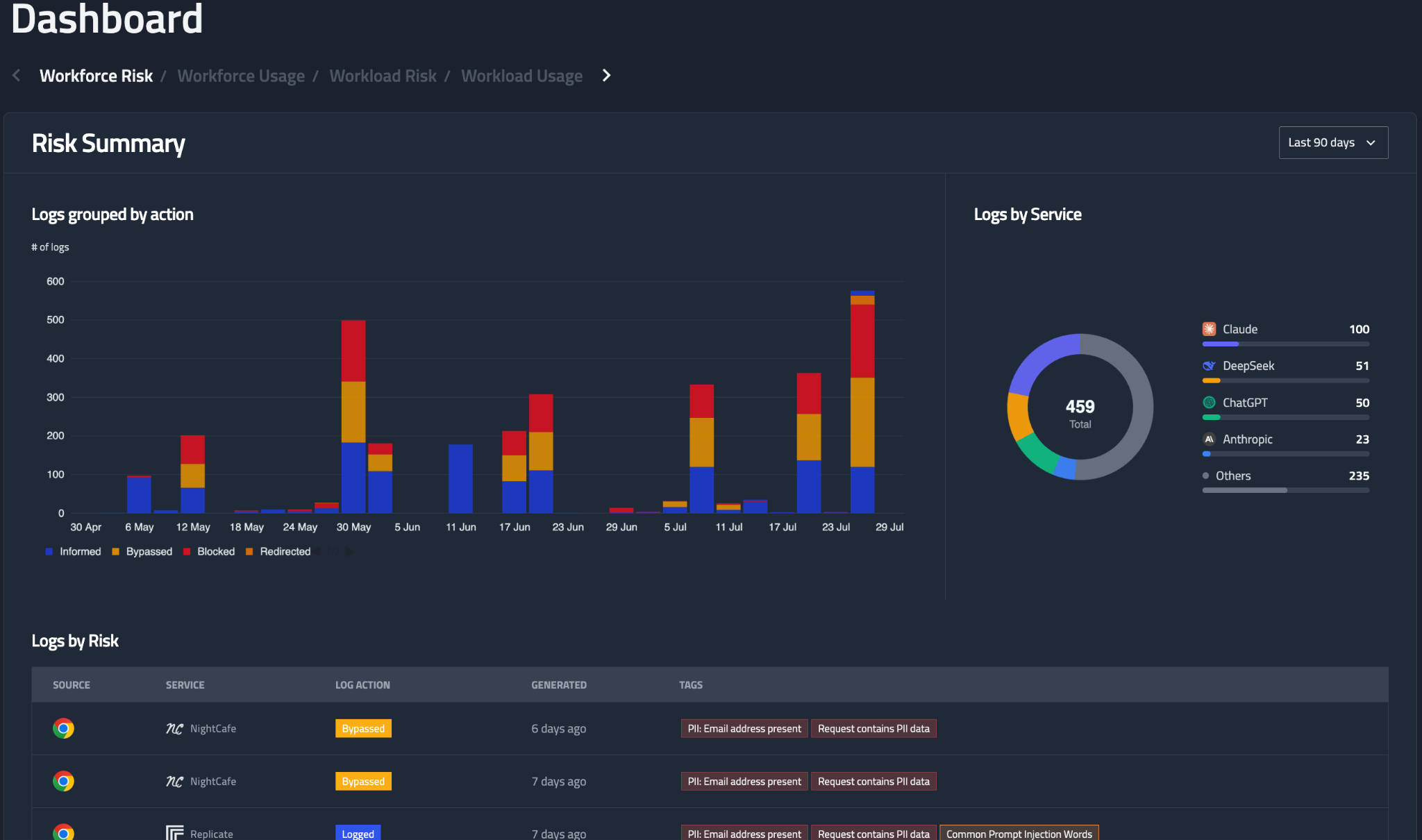
Workforce dashboards are now split into separate Usage and Risk views, which cuts the redundancy and lets each screen answer one question instead of both at once.
Under the hood
A set of changes that do not headline but take friction out of running the platform.
- Agent setup is simpler: the endpoint agent and browser extension detect region and platform from the project token, so there is nothing to configure by hand.
- SHA256 checksums ship alongside every agent installer, so you can verify a download before you trust it.
- Navigation is cleaner, with AI routes moved up a level and a streamlined layout for single-product organizations.
- An organization milestones indicator tracks your onboarding progress, and dashboard navigation now moves through a carousel with clickable indicators.
- Empty screens now tell you what to do next rather than leaving you guessing, and browser-extension configuration persists across restarts.
- A round of stability fixes across error handling, retries, and connection management.
See it against your own environment
The fastest way to know what this finds is to point it at your own setup. Book a call and we will walk it with you. Book a call

.png)