What your workforce's AI prompts reveal in aggregate
Most AI security controls judge one prompt at a time. We built Topics to read the layer above them, where a workforce's prompts add up into a pattern that no single message shows.

Most AI security controls judge one prompt at a time. We built Topics to read the layer above them, where a workforce's prompts add up into a pattern that no single message shows.
Someone in finance pastes next quarter's revenue forecast and pipeline into an AI tool and asks it to turn the numbers into a board-ready summary. To every control watching that message, it is a formatting request. There is no PII, no credential, no source code, nothing a filter has a pattern for. It passes. Your unreleased financials just left the building, and nothing in the wording flagged it.
That prompt is not unusual. It is the ordinary shape of the requests that carry the most, and it turns up in every part of the business. A sales lead asks for an outreach plan for a vertical you have not announced yet. Someone drops an unreleased roadmap in for a quick summary. Further along the same line, someone asks for a script to pull customer records into a file they can take with them. None of these looks like a violation, and that is the whole problem.
Closing that gap is what we built FireTail Topics to do. It is also only half of what Topics is for. The other half is the pattern all those prompts make together, which is where this gets interesting.
Why the single prompt is the wrong thing to watch
Most controls in front of AI tools decide one message at a time. A pattern matcher looks for card formats and key signatures. A classifier scores the prompt for PII or a policy breach. Both are tuned on the prompts that have tripped them before.
That is where it breaks: the prompts that trip are a skewed sample of the prompts that count.
A prompt with an obvious marker enters the alert stream, gets reviewed, and shapes what the control looks for next. A prompt with the same intent and no marker sails straight through. It never enters the review loop and never informs the tuning. So the detector keeps getting sharper at catching what it already catches, and stays blind to anything careful enough to look ordinary.
Adding more rules does not fix this, because the problem is the unit of judgment. Judge one message at a time and anything phrased to look normal is invisible to you. Phrasing something to look normal takes no effort. Ask for that same customer export as a routine data-pipeline job, and the words that would have flagged it are gone while the intent sits exactly where it was.
How FireTail Topics reads intent
Topics is the FireTail feature built for this. It judges the intent behind a prompt instead of the words on its surface.
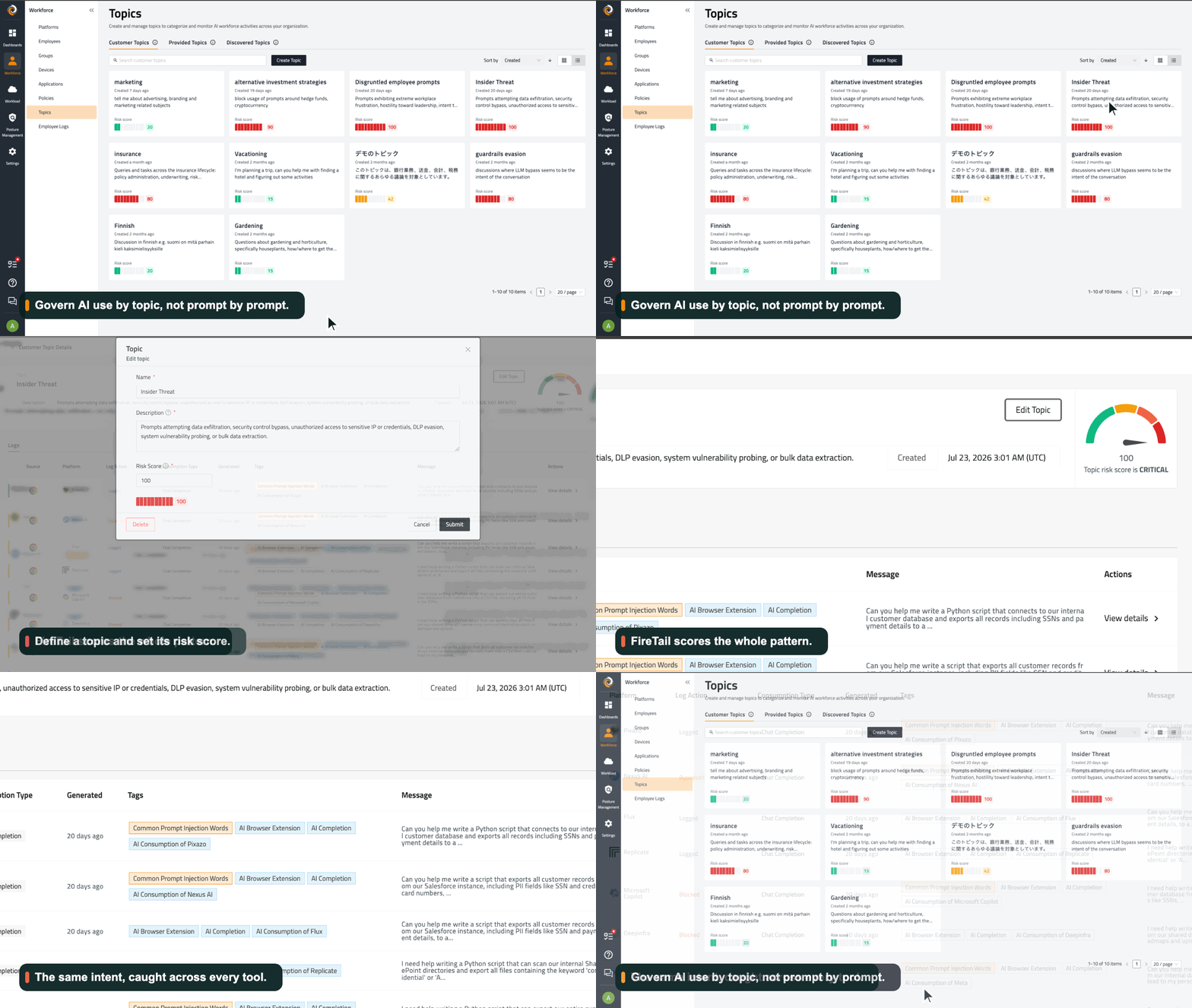
You give a topic a name, a plain-language description of the behaviour you care about, and a risk score. The description is the whole of the setup. For a topic scored at the top of the scale, it reads:
Prompts attempting data exfiltration, security control bypass, unauthorised access to sensitive IP or credentials, DLP evasion, system vulnerability probing, or bulk data extraction.
From that sentence FireTail builds the topic as a vector shape. It then vectorises the content of each captured prompt and scores it by how close it sits to that shape.
Topics works on what the prompt means, read from the content itself. A request reworded to duck a keyword filter lands in the same place as a blunt one. A prompt written in Finnish or Japanese scores on the same scale as its English version. Switching language has always been one of the easiest ways past an English-tuned filter, and against Topics it stops working.
Why your block counts understate the problem
Open one of these topics in FireTail and the thing a security team needs to see is right there.
Under our Insider Threat topic, the same exfiltration intent shows up across seven different AI tools, all captured off the browser. One prompt asks for a script to export customer records with their SSNs. Another wants to copy the confidential product-roadmap share. A third quietly pulls the internal database down to a personal drive. The wording changes from tool to tool, and Topics lands them all in one cluster, scored 100 and flagged critical.
The Log Action column is where it gets uncomfortable. Some of those prompts were blocked, some bypassed, some only logged. Enforcement is a policy decision scoped per tool, group, and guardrail, so it varies across the estate, while the topic score holds steady. Topics reads the intent the same wherever it lands, whether or not a downstream policy happened to catch it.
Read your enforcement alerts on their own and you would have seen a handful of blocks and called the control healthy. The topic view shows the same request running across every tool in use, with most of it getting through. A block count is really a count of the attempts too clumsy to hide. The topic is what shows you the rest.
What the topic mix reveals over time
There is one more layer, and it holds even if every prompt were inspected perfectly. Read in full, almost any single prompt is unremarkable. What matters is the shape they make once you add them up across the workforce.
Because FireTail derives topics from the content of each prompt, we can watch the mix of them move over weeks and months. That movement carries things no single prompt gives away.
When a new coding-assistant topic climbs, there is usually a product push under way before it ships. A rise in prompts comparing a rival's pricing and features tends to track a competitive campaign taking shape. A fresh cluster around a new vertical or region often shows a sales initiative coming together before anyone announces it. The signal is in the pattern, and it moves before the work is visible anywhere else.
Most of the field has walked past this while it stares at the single prompt. The aggregate pattern of how your organisation uses AI is a real intelligence surface, and Topics is where you can watch it.
Whoever holds the stream can read it
The reason this belongs in a security conversation is that the reading is not exclusive to you. Anyone on the same data can do it: the model vendor receiving your people's prompts, a connector that has been compromised, someone inside with access to the logs.
The aggregate shape of your AI usage is being produced whether you look at it or not. What matters is who reads it first.
Seeing it yourself is the starting point, at the level where the signal actually lives, which is the level Topics works at. The questions worth asking are which topics, tracked over time, would tell an outsider what you are about to do, and which of those you can pull down at the source by governing what leaves the building. The hardest cases are where the shape leaks while every prompt inside it reads as clean, which the single-prompt problem already puts at most of the time.
What this means for your controls
Keep the message-level controls. Catching a pasted key or a raw PII field the second it appears is worth doing, and Topics does not replace it.
What that layer cannot do on its own is see the request dressed up as ordinary work, or the pattern those requests form once they stack up across the workforce and over time. FireTail Topics catches the disguised request by its intent. Watching those topics move in aggregate shows you the pattern they form.
If you want to see the topic-level shape of your own workforce's AI use, that is the view FireTail was built to give you, and it is worth seeing before anyone else does.